Automation operations · 8 min
How to Prevent Duplicate Automation Runs: Stop Double Records, Emails and Charges
Retries, replays and overlapping triggers make automations do the same thing twice. Use this checklist to add business keys, safe retries and duplicate tests before double records reach customers.
By AutoMasteri Editorial Team · Published 2026-10-14
Duplicates are a reliability problem, not a tidiness problem
Most small businesses notice duplicate automation runs by accident. A customer asks why the welcome email arrived twice. Two salespeople call the same enquiry. An invoice is entered twice. Each looks like a small glitch, gets fixed by hand and is forgotten.
That is the wrong lesson. A workflow that sometimes does the same thing twice is telling you that it cannot tell the difference between a new event and a repeated one. For a spreadsheet row, that is an annoyance. For a refund, a stock adjustment, a WhatsApp message to a customer or a task assigned to a contractor, it is a real cost and a trust problem.
The fix is mostly design, not code. This checklist covers where duplicates come from, the idea that prevents most of them, and how to test and clean up safely.
Where duplicate runs come from
Duplicates come from a handful of predictable sources, and the platforms document most of them:
- The sender delivers the same event again. Stripe's webhook documentation says endpoints might occasionally receive the same event more than once, and Shopify's says an app might receive the same webhook more than once, for example after a network timeout or a retry;
- A timed-out step is replayed. Zapier's help centre warns that replaying an action that showed a timed-out error may create duplicate data, because the first attempt may already have succeeded;
- Two workflows listen to the same trigger. Zapier notes that if more than one Zap uses the same trigger, they will all run, because its deduplication only checks within the same Zap;
- A workflow triggers itself. A flow that starts on a new spreadsheet row and also writes a new row to that sheet becomes a loop;
- Test values were never replaced. A field typed in during setup, such as a fixed email address, means every live run writes to the same record;
- People resubmit. A slow form, a double-tapped button or a customer who sends the same enquiry from two channels creates a genuine second event for the same request.
Notice that only the last item is truly a human duplicate. The others are the normal behaviour of systems that retry, and a well-designed workflow should expect them.
The one idea that prevents most duplicates
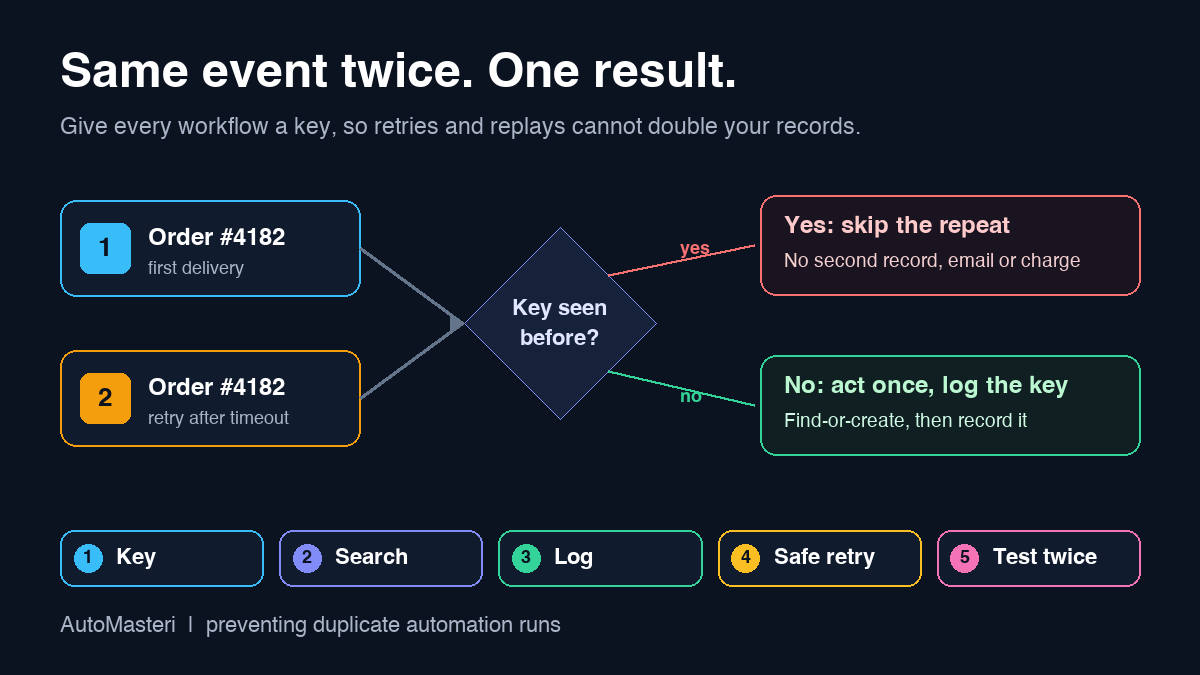
Engineers call it idempotency: doing the same operation twice should leave the business in the same state as doing it once. In practice, every workflow should answer one question before it acts: have I already handled this exact thing?
To answer it, the workflow needs a stable key, a value that is the same every time the same real-world event arrives and different for every new one. Payment platforms build this in. Stripe lets developers send an idempotency key with a request so that a retry after a connection error does not create a second object, and it recommends logging the IDs of webhook events already processed so repeats can be skipped. Shopify sends a delivery ID in the X-Shopify-Webhook-Id header for the same purpose.
No-code tools do some of this, but only in places. Zapier explains that polling triggers compare each item's unique ID with IDs the Zap has already seen, instant triggers skip that check, and action steps behave however the connected app behaves: some create a duplicate, some return an error, some ignore it. The platform guards the front door in some cases; the rest is your job.
1. Choose a business key for every workflow
Write down, for each workflow, the value that identifies one real-world event. Good keys come from the source system and never change: an order number, an invoice number, a payment or event ID, a form submission ID, a booking reference. An email address is a weaker key, because one customer can legitimately place two orders, but it is often the right key for a contact record.
Avoid timestamps and free text as keys. Stripe's documentation specifically says not to use the created time to decide whether an event has already been processed. Store the key in its own field wherever the workflow writes, so later steps and later people can search for it.
2. Search before you create
The most effective single change is to replace a plain create step with a find-or-create pattern. Search the destination for the business key first. If a record exists, update it or stop; if it does not, create it. Many apps offer this as a single find or create action, and Zapier lists it as a fix for duplicates where the connected app supports it.
Where no combined action exists, use a search step followed by a filter that only continues when nothing was found. Keep the search exact. A fuzzy name search that misses one record because of a trailing space will create the duplicate you were trying to avoid, so normalise keys, for example by trimming spaces and lowercasing email addresses, before you search or store them.
3. Keep a processed-events log
Some actions have nothing to search, such as a sent email or message. For these, keep a simple log of keys the workflow has already handled, in a table, a database or the automation tool's own data store. The first step of the workflow checks the log; the last step writes to it once the action has succeeded.
Decide how long to keep entries. Senders retry for a bounded period. Stripe states that it attempts live-mode deliveries for up to three days, and Shopify says it retries a failed delivery eight times over the next four hours, so the log must outlive the longest retry window you face. A few weeks also covers manual replays.
4. Make retries and replays safe
Retries are how a temporary outage avoids becoming lost data, so make them harmless rather than switching them off.
Before anyone presses replay on a failed run, they should check whether the failed step actually completed in the destination app. A timeout means no answer arrived in time, not that nothing happened. Put that check in the routine your team follows for failed runs; the exception monitoring checklist covers who owns that queue and how quickly it should be cleared: https://automasteri.com/blog/automation-exception-monitoring-checklist-small-business/ .
Know your platform's retry settings too. Make, for example, can store failed runs as incomplete executions so they can be retried later, and offers sequential processing so each run finishes before the next starts, with new runs waiting until incomplete executions are resolved. Make also warns that if the incomplete executions folder is full, failed data is discarded. These settings affect both duplicate and data-loss risk, so choose them on purpose.
5. Give each trigger one owner
List the triggers your workflows use and look for any source that feeds more than one workflow. Two flows on one form should be deliberate and do different jobs; otherwise merge them into one workflow with branches, or add filters so each event takes one route.
Do the same for test copies. A duplicated workflow left switched on after an experiment is one of the quietest sources of double emails, and it often belongs to someone who has since moved on. If ownership is unclear, the automation offboarding checklist shows how to build an ownership register: https://automasteri.com/blog/automation-offboarding-checklist-employee-leaves/ .
6. Put a gate in front of actions you cannot undo
A duplicate contact can be merged; a duplicate refund, a second message to a customer who asked to stop, or a double stock deduction cannot be cleanly undone. For those actions, combine the duplicate check with a human or rule-based gate, such as an amount limit, a once-per-customer-per-day rule, or approval above a threshold.
The guide to building a human approval matrix explains how to decide which actions need a person in the loop and who that person is: https://automasteri.com/blog/human-approval-matrix-ai-automation/ .
How to test that duplicates are handled
Test duplicate protection before go-live and after every change, using test data, never live customers.
- Send the same event twice in a row and confirm exactly one record, one email and one task;
- Send it twice almost at the same moment, since two runs that start together can both pass a search that finds nothing;
- Replay a failed run in which the action actually succeeded and confirm the replay stops at the duplicate check;
- Send two genuinely different events from the same customer and confirm both are processed, so the check is not too aggressive;
- Change the key's formatting, such as capital letters or a trailing space, and confirm it is still recognised.
Add these cases to your acceptance tests so they run every time the workflow changes; the user acceptance testing checklist describes how to structure that sign-off: https://automasteri.com/blog/automation-user-acceptance-testing-checklist/ .
Cleaning up duplicates that already exist
Fix the cause before the data, or the clean-up will need repeating. Decide merge rules first: which record wins, which fields are kept, and what happens to linked notes, tasks and invoices. Export a copy, merge a small sample, check it with the people who use the records, then do the rest.
Avoid bulk deletion: two similar records may be two real customers. Where duplicates touched money or customer messages, fix each one individually and, where appropriate, contact the customer.
A worked example: the double booking confirmation
A small clinic sends a booking confirmation and creates a CRM contact whenever its online calendar posts a new booking to a webhook. Some patients start receiving two confirmations. The run history shows two runs with identical booking references a few seconds apart: the calendar resent the event because the workflow took too long to respond.
The booking reference becomes the business key and is stored on the CRM record. The workflow checks a small processed-bookings table first and stops if the reference is there, and the create-contact step becomes find-or-create on email. The team tests the same booking twice, then two bookings from one patient; both behave correctly. Existing duplicate contacts are merged after an export.
Sources and next step
Sources, all returning HTTP 200 on 14 October 2026. Zapier, Zap is creating duplicate data: https://help.zapier.com/hc/en-us/articles/8496218141453-Zap-is-creating-duplicate-data . Zapier, how Zapier handles duplicate data: https://help.zapier.com/hc/en-us/articles/8496260269965-How-Zapier-handles-duplicate-data-in-Zap-workflows . Make, scenario settings: https://help.make.com/scenario-settings . Stripe, webhooks: https://docs.stripe.com/webhooks . Stripe, idempotent requests: https://docs.stripe.com/api/idempotent_requests . Shopify, verifying deliveries and ignoring duplicates: https://shopify.dev/docs/apps/build/webhooks/verify-deliveries . Platform behaviour changes, so check current documentation for your plan; these references describe the platforms and are not a claim that AutoMasteri uses or is certified by any of them.
Pick the workflow whose duplicates would hurt most, usually anything touching money or customer messages, and write down its business key this week. For help finding which workflows are at risk, start with the free automation audit: https://automasteri.com/free-automation-audit/ . AutoMasteri offers mentorship, strategy and guided implementation; hands-on rebuild or data clean-up work is agreed separately and is not implied by this checklist.
FAQ
Why does my automation run twice for the same event?
The most common reasons are a sender retrying a delivery, a replay after a timeout, two workflows sharing one trigger, or a workflow that triggers itself. Search the run history for the repeated ID to see which one it is.
What is an idempotency key in plain English?
It is a value that identifies one real-world event, such as an order number or event ID. The workflow checks it before acting, so a repeated delivery of the same event is recognised and skipped instead of processed again.
Should I turn off retries to stop duplicates?
Usually not. Retries protect you from losing data during temporary outages. Make the workflow safe to retry instead, with a duplicate check on the business key.
Is an email address a good key for preventing duplicates?
It is a reasonable key for contact records, but not for orders, bookings or payments, because one person can have several of those. Use the source system's own reference for those events.
How long should I keep a processed-events log?
Longer than the longest retry window of the systems that send you events, plus time for manual replays. A few weeks is a sensible default for most small businesses.
Can AutoMasteri fix duplicates in my workflows?
AutoMasteri provides mentorship, strategy and guided implementation, so it can help you find the causes and plan the fixes with your team. Hands-on rebuild or data clean-up is scoped and agreed separately.
Build the map before the tools.
Start with the free AutoMasteri automation audit, or apply for a mentor review if you want Reji to review the operating system behind your customer journey.