Automation operations · 7 min
Automation User Acceptance Testing Checklist Before Go-Live
A workflow that runs without errors is not automatically ready. Use this acceptance checklist to test scenarios, data, approvals, failures, replay, rollback and evidence before a business automation goes live.
By AutoMasteri Editorial Team · Published 2026-10-11
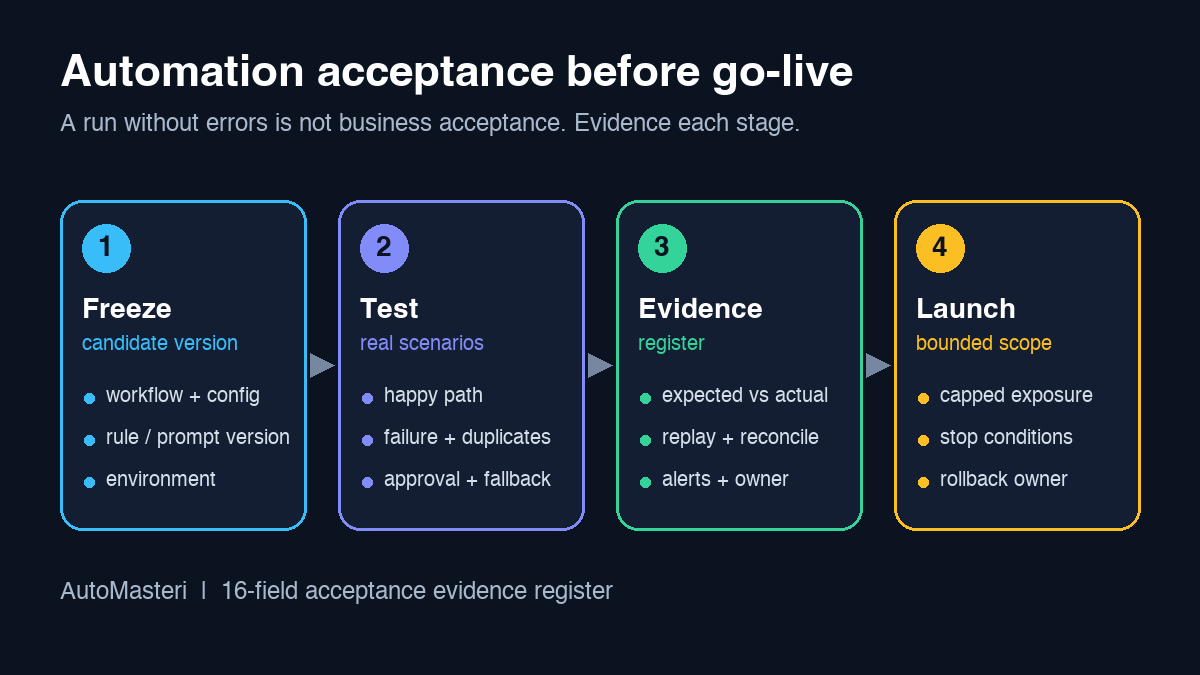
An automation is ready only when the business can accept its behaviour
Technical execution is not the same as business acceptance. A workflow can run without errors and still contact the wrong customer, create a duplicate invoice, overwrite a field, skip an approval, expose sensitive data, or leave staff unable to recover when a provider times out.
User acceptance testing gives the people who own the business outcome a structured way to prove that the automation behaves correctly before go-live. The goal is not one perfect demo. It is to test normal work, difficult inputs, failure modes, human control, evidence, and rollback under conditions close enough to reality to support a responsible decision.
The 16-field automation acceptance evidence register
Record one row per workflow and test scenario. If a field is empty, the go-live decision is not yet evidenced.
- Workflow name, version, business owner, and technical owner;
- Business purpose and measurable acceptance outcome;
- Trigger, input source, schedule, and entry conditions;
- Systems, accounts, vendors, environments, and data classes involved;
- Authorized actions and explicitly forbidden actions;
- Test environment and production-separation evidence;
- Test-data source, sensitivity, masking, retention, and deletion owner;
- Happy-path scenario and expected observable result;
- Boundary, invalid-input, duplicate, timeout, and partial-failure scenarios;
- Human approval, escalation, pause, and manual-fallback checks;
- Idempotency, replay, deduplication, and reconciliation evidence;
- Logs, alerts, dashboards, audit trail, and evidence location;
- User acceptance tester, business approver, and decision timestamp;
- Go-live scope, initial exposure, stop conditions, and rollback owner;
- Post-launch observation window, success thresholds, and review time;
- Exceptions, residual risks, support path, next test, and evidence links.
1. Freeze the candidate version
Acceptance evidence means something only when testers know exactly what they tested. Record the workflow version, configuration, connected services, credentials by reference, prompt or rule version, data schema, and environment. If the implementation changes during testing, mark the earlier result as superseded and rerun the affected scenarios.
NIST's configuration-management guidance treats a controlled baseline, approved changes, and retained evidence as the foundation for trustworthy systems. The same idea applies to a small business workflow: the approver should be able to trace a go-live decision back to one identifiable candidate version, not to screenshots and memory.
2. Turn the business promise into acceptance criteria
Write the workflow's purpose in observable terms. “Automate lead follow-up” is too vague. A better criterion names the trigger, eligible audience, timing window, approved channel, content source, owner, exclusion rules, and recorded result.
Separate required outcomes from nice-to-have improvements. Required criteria should include safety and control:
- no customer action without the correct authorization;
- no duplicate side effect;
- no silent loss of a lead, order, or ticket;
- no unsupported claim in customer-facing content;
- no data from another customer or tenant;
- a usable human fallback.
Performance or conversion goals matter, but they should never replace correctness and customer protection.
3. Map the whole action boundary
List what the automation may read, decide, write, send, purchase, publish, delete, or escalate. Then list what it must never do without additional approval. This boundary prevents a harmless-looking test from triggering a real message, charge, support ticket, record change, or public post.
For each connected system, record the account, permissions, environment, data scope, rate limit, and owner. Confirm that test credentials cannot reach production when a separate test environment exists. When it does not, use the smallest reversible test with synthetic or approved data and explicit owner supervision. Our human approval matrix guide explains how to decide which actions need review, one-by-one approval, or a human-only decision: https://automasteri.com/blog/human-approval-matrix-ai-automation/ .
4. Prepare safe, representative test data
Easy dummy data produces false confidence. Build a test set that represents normal, missing, malformed, duplicate, delayed, multilingual, oversized, and edge-case inputs. Include dates, currencies, phone formats, names, attachments, empty fields, unexpected statuses, and records that should be excluded.
Use synthetic or properly approved data wherever possible. Do not copy a customer database into a convenient spreadsheet or test account. Record where test data came from, who approved its use, which sensitive fields were masked, how long it will be kept, and who removes it after the test.
5. Test the happy path end to end
Run the most common business scenario from the real trigger to the final system of record. Verify each important transition, not only the final screen: timestamps, field mappings, owner assignment, content, links, attachments, status changes, notification routing, and audit evidence.
Have an actual business user judge the result. A developer can confirm that an API returned success; the operations owner must confirm that the resulting task, message draft, invoice state, support record, or handoff is correct and usable.
6. Exercise failure and uncertainty
Deliberately test what happens when a provider times out, returns an error, responds slowly, sends a duplicate webhook, partially accepts a request, or becomes unavailable after the workflow starts. Also test invalid credentials, expired tokens, missing fields, unavailable assignees, and rate limits.
The workflow should distinguish three states: confirmed failed, confirmed succeeded, and outcome unknown. Retrying an unknown side effect can create duplicates. A safe design pauses, reconciles against the system of record, and escalates when certainty is unavailable. AWS's Well-Architected operational excellence guidance makes the same point at larger scale: anticipate failure, make small reversible changes, and build observability before you need it.
7. Prove human control
Test every approval gate with approve, reject, edit, timeout, unavailable-approver, and delegated-approver cases. Verify that sensitive actions stay blocked when approval evidence is missing. Confirm who can pause the workflow, where the pause control lives, and what happens to queued or in-progress items.
Then run the manual fallback. Staff should be able to continue the critical business process while the automation is paused. The fallback needs a clear entry condition, an owner, a temporary record, a customer-safe communication rule, and a reconciliation step for when automation resumes.
8. Verify replay and reconciliation safety
Many automation failures appear after a restart. Test duplicate triggers, manual replay, scheduled reruns, delayed webhook delivery, and retry after partial completion. The workflow should prevent duplicate customer messages, charges, tickets, orders, tasks, or records wherever duplication would cause harm.
Reconcile source and destination counts, IDs, amounts, statuses, and exception queues. If a workflow cannot be replayed safely, document the exact recovery procedure and the person who decides. “Run it again and check” is not a recovery plan.
9. Check observability and evidence
Acceptance testing should prove that operators can see what matters after launch. Verify logs, metrics, alerts, audit events, retry queues, dashboards, and ownership. An alert should identify the workflow, affected item, severity, current state, and next action without exposing unnecessary personal or secret data.
Test that alerts reach the right operational destination and that staff know what to do with them. Avoid sending live customer or paid-channel test messages just to prove monitoring; use approved dry-run or internal evidence paths where they exist.
10. Approve a bounded launch
Go-live approval should name the exact candidate version, accepted scenarios, known exceptions, residual risks, initial scope, start time, observation window, stop conditions, rollback owner, and support path. Keep initial exposure small enough to observe and reverse.
A sensible first release may cover one team, one region, one low-risk segment, or a capped batch. Google's site reliability engineering material on release engineering describes the value of repeatable releases that build confidence in stages. Do not expand because the first few runs look normal: complete the observation window, review exceptions, reconcile outcomes, and record the expansion decision.
11. Separate acceptance from improvement
Not every finding blocks launch. Classify each one as a critical blocker, required before launch, controlled exception, or post-launch improvement. A broken approval gate, cross-customer data risk, uncertain payment side effect, or missing rollback path is a blocker. A dashboard-label preference can usually wait if it does not affect safe operation.
Every exception needs an owner, an expiry date, a monitoring method, and closure evidence. Permanent “temporary exceptions” are a sign that the acceptance decision can no longer be trusted.
12. Close the test with a signed evidence package
The final package should contain the acceptance register, candidate version, scenario evidence, open exceptions, privacy and security review, operating instructions, fallback, rollback plan, approver decision, and post-launch review time.
Store the evidence where the operating team, not only the builder, can find it during an incident. Use readable scenario names, stable links, timestamps, affected record IDs, and a short decision summary. A different authorized operator should be able to understand what was accepted, repeat a check, find the safe stop point, and continue recovery without guessing.
Sources and next step
NIST SP 800-128 Rev. 1, security-focused configuration management (controlled baselines, change approval, evidence): https://csrc.nist.gov/pubs/sp/800/128/upd1/final . AWS Well-Architected Operational Excellence pillar (anticipating failure, small reversible changes, observability): https://docs.aws.amazon.com/wellarchitected/latest/operational-excellence-pillar/welcome.html . Google SRE book, Release Engineering (repeatable, staged releases): https://sre.google/sre-book/release-engineering/ . All three URLs returned HTTP 200 on 11 October 2026. They support general practices, not a claim that AutoMasteri is certified or uses a particular platform.
Map one workflow into the register, then review it through AutoMasteri's free automation audit: https://automasteri.com/free-automation-audit/ . If you are earlier in the journey, start with the AI automation audit checklist: https://automasteri.com/blog/ai-automation-audit-checklist-small-businesses/ . AutoMasteri offers mentorship, strategy, and guided implementation; production builds, integrations, monitoring, and go-live approval are agreed separately and are not implied by this checklist.
FAQ
Who should perform automation user acceptance testing?
Business users who understand the real process should test, with technical support. The implementation team should not be the only approver of its own work.
Is one successful end-to-end run enough?
No. Acceptance should cover normal, boundary, invalid, duplicate, timeout, partial-failure, human-control, replay, and rollback scenarios in proportion to the workflow's risk.
Can production customer data be used for testing?
Prefer synthetic or approved masked data. If production-like data is necessary, document the authority, minimization, protection, access, retention, and deletion before use.
What makes an automation test a blocker?
Unsafe customer actions, cross-tenant data, duplicate financial or communication side effects, missing approval control, unverifiable outcomes, or no workable rollback or fallback.
How long should the initial observation window last?
Set it from the workflow's frequency and risk. It should cover enough representative runs to expose common exceptions before the scope expands.
Does AutoMasteri run acceptance testing for me?
AutoMasteri provides mentorship, strategy, and guided implementation. Whether hands-on testing, builds, or monitoring are included depends on the agreed engagement, so confirm scope through the free automation audit or support page first.
Build the map before the tools.
Start with the free AutoMasteri automation audit, or apply for a mentor review if you want Reji to review the operating system behind your customer journey.