AI automation governance · 7 min
Build a Human Approval Matrix Before AI Automates Business Actions
Separate read-only preparation, batch review, one-by-one approval, and human-only decisions. This practical matrix shows owners, evidence, expiry, failure paths, and the checks to run before AI or automation takes action.
By AutoMasteri Editorial Team · Published 2026-10-06
Why action-level approval matters
Business automation often begins with a harmless goal: summarize enquiries, draft replies, update a spreadsheet, or remind the team about overdue follow-up. The risk changes when the same workflow can send a customer message, modify a production record, change user access, publish content, issue a refund, or trigger a payment.
At that point, the important question is no longer “Can AI do this?” It is “What level of human authority should this exact action require?”
A human approval matrix gives the business a practical answer. It separates safe preparation from consequential execution, names the approver, shows the evidence required, and defines what happens if approval is late, unclear, or unavailable.
Classify actions, not entire tools
Do not label one application “safe” or “unsafe.” The same tool may perform very different actions.
For example, an AI support assistant may:
- summarize a ticket;
- classify its topic;
- draft a response;
- send the response;
- change the customer's subscription;
- issue a refund;
- close the complaint as resolved.
The first two are normally low-impact internal work. Drafting is preparation. Sending becomes externally visible. Changing a subscription or refund affects money and customer rights. Closing the complaint can hide an unresolved problem.
OWASP's AI Agent Security guidance recommends least privilege at the tool and action level, explicit authorization for sensitive operations, and human approval for high-impact or irreversible actions. That is a better design than giving the agent broad access and adding one generic “Are you sure?” prompt.
Six factors for each action
For every action, score six factors:
- Impact: What harm can happen if the action is wrong?
- Reversibility: Can the business undo it completely and quickly?
- Visibility: Is it private preparation or an external/public action?
- Sensitivity: Does it touch customer, employee, financial, credential, or confidential data?
- Authority: Who is allowed to make this decision today?
- Evidence: What context must the approver see before deciding?
If any factor is unknown, classify the action at the higher risk level until the owner resolves the uncertainty.
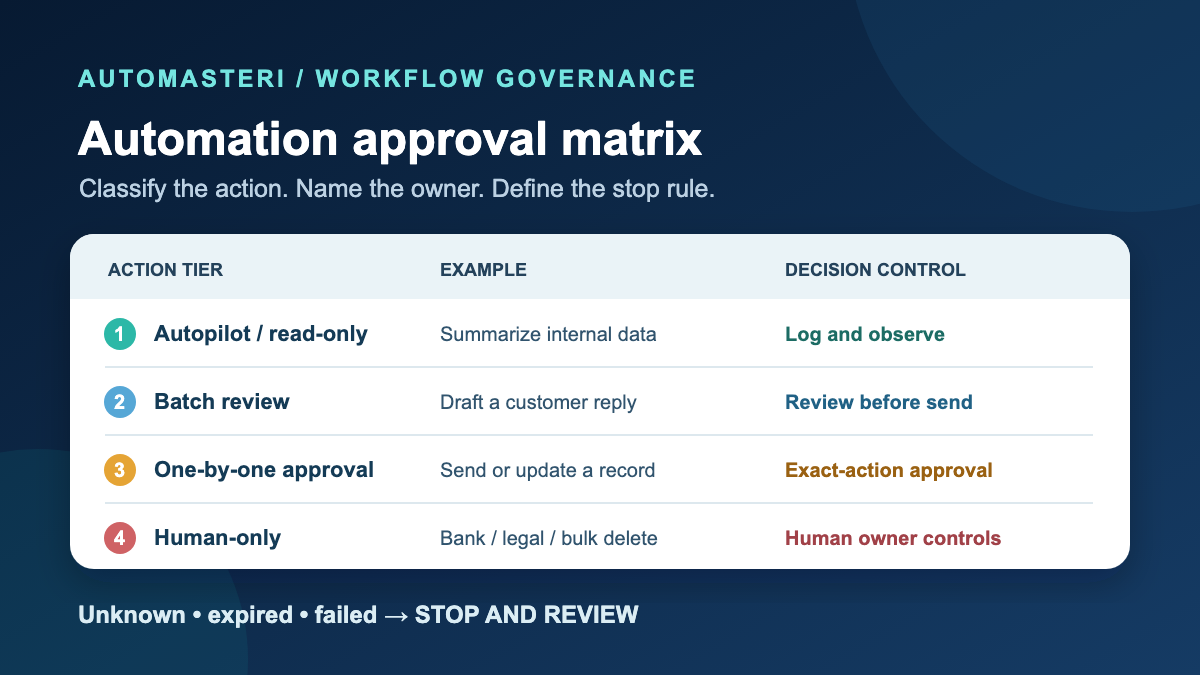
Use four practical approval levels
Small businesses do not need a complicated governance department to start. Use four clear levels.
Level 1 — Autopilot: read-only and low-consequence
Examples:
- summarize internal reports;
- classify enquiries or tickets;
- detect missing fields;
- prepare a weekly dashboard;
- compare a document against an approved checklist;
- flag exceptions without changing the underlying record.
Autopilot still needs boundaries. The workflow should use read-only access where possible, avoid sensitive data it does not need, log what it reviewed, and stop when the source is incomplete or suspicious.
Level 2 — Batch review: drafts and reversible preparation
Examples:
- draft customer replies without sending;
- prepare content ideas without publishing;
- suggest CRM updates without committing them;
- build a follow-up queue;
- recommend tags or categories;
- prepare invoice or renewal reminder drafts.
A person can review these in a daily or twice-daily queue. The approver should see the source context, proposed output, confidence or exception flags, and the next action that will occur after approval.
Level 3 — One-by-one approval: consequential execution
Examples:
- send an external customer email or WhatsApp message;
- write to production customer records;
- publish a social or website update;
- deploy code or configuration;
- change user roles or access;
- issue a refund or apply account credit;
- submit a marketplace profile or formal application.
Approval should be bound to the exact target and parameters. “Approve email sends” is too broad. The record should show which recipient, which message, which data source, which account, who approved it, when approval expires, and what will happen if execution fails.
Level 4 — Human-only: irreversible or sensitive judgment
Examples:
- bank-account and payment-authority changes;
- payroll and compensation decisions;
- hiring, firing, disciplinary, or sensitive employee decisions;
- legal commitments or contract acceptance;
- large or unusual financial transfers;
- permanent bulk deletion;
- domain ownership transfer;
- security recovery that replaces trusted account owners.
AI can organize evidence or prepare a checklist, but the decision and execution stay with an authorized human. If the business is unsure whether an action belongs here, keep it human-only until there is a reviewed policy.
Build the approval matrix
Use a table that the owner and implementation team can review together.
- Read weekly lead metrics — Autopilot. Why: Read-only/internal. Approver: Workflow owner. Evidence: Data source and date. Expiry: Same run. If it fails: Stop if source missing.
- Draft follow-up messages — Batch review. Why: External impact only after send. Approver: Sales lead. Evidence: Lead context, consent, draft. Expiry: 24 hours. If it fails: Return for edit.
- Send WhatsApp campaign — One-by-one/campaign approval. Why: External, consent, reputation. Approver: Authorized campaign owner. Evidence: Audience, consent, template, schedule, provider state. Expiry: Short window. If it fails: Do not send; log exception.
- Update customer plan — One-by-one. Why: Billing/service impact. Approver: Account owner. Evidence: Customer request, current plan, proposed change. Expiry: Short window. If it fails: Leave unchanged.
- Publish public claim — One-by-one. Why: Public and reputational. Approver: Brand/product owner. Evidence: Sources, final copy, destination. Expiry: Short window. If it fails: Keep draft private.
- Change bank details — Human-only. Why: Financial and fraud risk. Approver: Named finance owner. Evidence: Independent verification. Expiry: Immediate session. If it fails: No automated execution.
- Bulk delete records — Human-only. Why: Destructive and hard to reverse. Approver: Data owner + second approver. Evidence: Exact target, backup, rollback, retention rule. Expiry: Immediate session. If it fails: Fail closed.
Add a version number and review date. When a workflow changes tools, destinations, permissions, or data, review its matrix row again.
Make the approval screen useful
A weak approval message says: “The AI wants to run an action. Approve?”
A useful approval preview shows:
- the proposed action in plain language;
- the exact account, customer, record, page, or campaign affected;
- old value and proposed new value where relevant;
- the source evidence used;
- sensitive fields removed from the preview;
- risk level and reason;
- expected result;
- rollback or stop path;
- approval expiry;
- whether another approver is required.
OWASP recommends binding approval to the exact actor, tool, target, normalized parameters, timestamp, and expiry. This reduces the risk that an approval for one action is replayed or reused for a different target.
Separate preparation, approval, and execution
For high-impact actions, do not let one AI step propose, approve, and execute its own decision.
Use three stages:
- Prepare: collect context and propose the action.
- Approve: an authorized human reviews the exact preview.
- Execute: a separate controlled component validates scope and approval before acting.
The execution step should fail closed when approval is missing, expired, changed, or cannot be verified. It should also reject targets outside the approved scope. For payment, access, deletion, deployment, or account recovery, use stronger authentication and dual approval where the business risk requires it.
Define exception and timeout behavior
An approval queue can become a hidden bottleneck if nobody owns it. Every row needs:
- primary and backup approver;
- expected response time;
- escalation path;
- timeout behavior;
- safe default.
The safe default for a consequential action is normally do nothing. Do not send the message, spend the money, change the record, or publish the claim because the approver did not respond.
For low-risk drafts, timeout can move the item back to the queue. For urgent customer or security issues, route to a named human channel rather than silently raising automation authority.
Test with scenarios before connecting production
Run a private scenario test for each approval level:
- correct normal request;
- incomplete source data;
- duplicate request;
- wrong customer or account;
- expired approval;
- approver rejection;
- unavailable downstream provider;
- malicious or instruction-like text inside retrieved content;
- attempt to exceed scope;
- execution failure after approval.
Verify that logs record the proposal, classification, approval result, execution result, and exception without leaking credentials or unnecessary personal data.
Do not test payments, real customer messages, live access changes, deletion, public publishing, or production deployment just to prove the workflow. Use isolated test data or a non-executing preview until the owner approves a controlled live test.
Review autonomy using real evidence
Automation authority can increase only after the workflow proves it is stable. Track:
- approval and rejection rates;
- common corrections;
- duplicate attempts;
- time waiting for approval;
- exceptions and failures;
- actions attempted outside scope;
- customer complaints or reversals;
- cost and provider usage;
- whether rollback actually works.
Do not promote an action from approval to autopilot because the team is tired of reviewing it. Promote it only when the action is low consequence, highly reversible, consistently accurate, tightly scoped, and easy to audit.
AutoMasteri can help business owners map workflows, clarify follow-up, define implementation priorities, and build better operating systems. The approval matrix keeps that automation aligned with real business authority instead of turning random tools into uncontrolled action.
Sources and next step
NIST AI Risk Management Framework (voluntary AI governance): https://www.nist.gov/itl/ai-risk-management-framework . OWASP AI Agent Security Cheat Sheet (action-level approval, scope, and fail-closed controls): https://cheatsheetseries.owasp.org/cheatsheets/AI_Agent_Security_Cheat_Sheet.html . Both source URLs were checked for HTTP 200 on 5 October 2026. They support the general control patterns, not a claim that AutoMasteri is certified or uses a specific technology.
Use this matrix as a working template, then review one real workflow through AutoMasteri's free automation audit: https://automasteri.com/free-automation-audit/ . Define the human owner and stop condition before configuring an external send or financial action.
FAQ
What is a human-in-the-loop approval workflow?
It is an automation that pauses at defined points so an authorized person can review, edit, approve, or reject an action before it creates consequences.
Which AI tasks can run automatically?
Start with read-only, internal, low-consequence work such as summarizing, classification, missing-field checks, and private reporting. Even these tasks need scoped access, logs, and stop conditions.
Which actions should always need approval?
External communications, public publishing, production writes, access changes, deployments, refunds, payments, destructive actions, and sensitive customer or employee decisions require one-by-one approval or human-only control based on risk.
Can one approval cover a whole campaign?
Only when the exact audience, consent basis, content/template, schedule, channel, limits, and owner are visible and approved. Material changes should require a new approval.
What happens if the approver does not respond?
The workflow should use a safe timeout. For consequential actions, the normal default is not to execute and to route the exception to a named backup owner.
Is the NIST AI RMF a certification or legal checklist?
No. NIST describes it as a voluntary risk-management framework. Businesses should apply appropriate professional, legal, security, and sector guidance for their actual context.
Build the map before the tools.
Start with the free AutoMasteri automation audit, or apply for a mentor review if you want Reji to review the operating system behind your customer journey.