Automation operations · 8 min
Automation Exception Monitoring Checklist for Small Businesses
Most automation failures are silent: a trigger stops firing or a filter rejects every record. Use this checklist to define normal, spot absences, assign owners and prove recovery after go-live.
By AutoMasteri Editorial Team · Published 2026-10-12
The failure nobody sees is the expensive one
Most small businesses find out an automation has stopped working from a customer. A lead says nobody replied. A client asks why their invoice never arrived. By then the problem is days old, and the clean-up is bigger than the original fault.
Errors that throw a red warning are the easy case. The harder ones are quiet: a trigger that stops firing after a form is edited, an expired connection that the platform reports only inside its own run history, a filter that now rejects every record, or a step that succeeds technically while writing the wrong value. Nothing crashes. Work simply stops arriving.
Exception monitoring is the routine that catches these situations early. It does not need an enterprise observability stack. It needs a written definition of normal, a few checks that compare reality against it, a named owner for every alert, and a habit of proving recovery before an issue is closed. This checklist sets that up for one workflow at a time.
The 10-field automation exception register
Keep one row per workflow. If you cannot fill a field, that gap is your first monitoring task.
- Workflow and trigger: the exact process and the condition that should start it;
- Expected result: what a successful run produces, and where it can be seen;
- Normal range: typical run count, volume, and completion time for each period;
- Failure signals: error, delay, missing record, duplicate, rejected item, or customer report;
- Severity: informational, degraded, customer-impacting, or critical;
- Owner and backup: the person who responds, and who covers when they are away;
- Evidence: run ID, timestamp, affected record, input and output state, log reference;
- Safe fallback: the manual process or pause that protects customers meanwhile;
- Recovery proof: the check that shows normal handling has resumed with no side effects;
- Prevention action: the validation, design change, or training that reduces repeats.
1. Write down what normal looks like
You cannot spot an absence until you know what presence looks like. For each workflow, record how often it should run, roughly how many items it handles in a normal day or week, and how long one item usually takes from trigger to finished result. Use your own run history for this, not a guess.
Be specific about time. A website enquiry workflow might normally create a CRM record within a few minutes and hand the lead to a salesperson the same working morning. A month-end invoicing workflow might run once, on one date, for a known number of clients.
Note the quiet periods too. A workflow that legitimately handles nothing on Fridays or overnight will raise false alarms unless the expectation says so, and false alarms are how monitoring gets ignored.
2. Monitor for absence, not only for errors
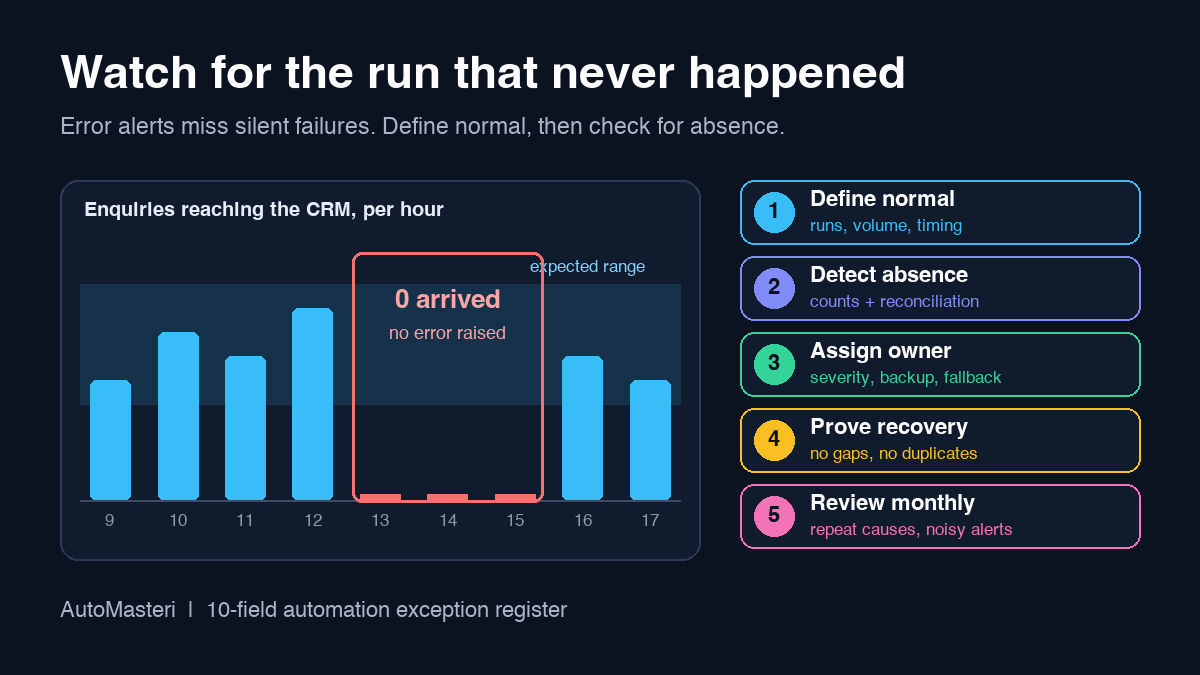
Error notifications only fire when something runs and fails. They say nothing when the workflow never starts. That is why the most useful single check for a small business is often a count: did the expected thing happen in the expected window?
Simple versions work well. If no new enquiry has reached the CRM by late morning on a working day, someone looks. If yesterday produced half the usual number of follow-up tasks, someone looks. The check can be a scheduled report, a dashboard tile, or a short daily review, as long as an owner actually sees it.
Also confirm what your automation platform records by default. Zapier, for example, gives every run a status that you can review in Zap history, so failures are visible if someone checks. Make stores failed runs as incomplete executions only when that option is switched on, and its help centre notes it is disabled by default. Small settings like these decide whether a failure leaves evidence or vanishes.
3. Reconcile what went in against what came out
Counts at each end of a workflow catch problems that no single step reports. Compare form submissions with created CRM records, paid orders with issued invoices, booked appointments with confirmation messages, and new support tickets with assigned tickets. The numbers do not have to match perfectly every hour, but the difference should be explainable.
Treat an unexplained mismatch as an exception even if every run shows success. Successful runs that write a lead to the wrong pipeline, skip records because of a stale filter, or create the same task twice all look healthy at step level. Reconciliation is how you notice. Our automation user acceptance testing checklist covers proving these checks before launch: https://automasteri.com/blog/automation-user-acceptance-testing-checklist/ . This step keeps them running afterwards.
4. Alert on the customer symptom, then find the cause
Google's site reliability engineering guidance frames monitoring around two questions: what is broken, and why. The first is the symptom, the second is the cause. For a business workflow, the symptom is what a customer or colleague would feel: an enquiry with no reply, an order with no confirmation, a ticket with no owner.
Alert on symptoms wherever you can, because many different causes produce the same customer impact and you will not predict them all. An expired login, a renamed spreadsheet column, a changed form field, and a provider outage can all end in the same missed follow-up.
5. Give every exception a severity and a named owner
Use a small, consistent scale so people respond in proportion:
- Informational: worth recording, no action needed now, for example a single retried step that then succeeded;
- Degraded: work is slower or partly manual, but customers are still served;
- Customer-impacting: someone is not getting a reply, record, message, or service they should;
- Critical: wrong messages, money, data exposure, or a wide outage that needs the workflow paused at once.
For each level, decide in advance how quickly the owner should look and when the issue escalates to the next person. The right response times depend on your business, so set them deliberately rather than copying someone else. Every workflow needs a named owner and a backup. An alert that goes to a shared inbox with no accountable person is a notification, not monitoring.
6. Keep alerts few, clear, and worth acting on
The same Google SRE chapter warns that when alerts come too often, people start to skim or ignore them, sometimes missing the real one hidden in the noise. Effective alerting has good signal and very low noise. In a small team, alert fatigue arrives quickly because the same few people receive everything.
A useful alert names the workflow, the affected item or count, the severity, what has already been tried, and the first action to take. It goes to a place the owner actually watches during working hours. It does not carry full customer details or secrets; a record ID and a link to the system of record are enough. If an alert has fired several times without anyone needing to act, change the threshold or remove it.
7. Prepare the fallback before you need it
When a workflow fails, the business still has to run. For each workflow, write down the manual path: who takes over, where they record the work, what customers are told, and how the manual records are merged back once automation resumes. Confirm who is allowed to pause the workflow and where that control lives.
Some decisions should always return to a person when the automation is unsure, such as refunds, sensitive messages, or anything that cannot be undone. Our human approval matrix guide explains how to classify those actions: https://automasteri.com/blog/human-approval-matrix-ai-automation/ .
8. Prove recovery before closing the issue
Fixing the cause is only half the job. Before an exception is closed, show that the backlog was handled, that nothing was processed twice, and that new items are flowing normally. Re-run the reconciliation from step 3 for the affected period and keep the result with the record.
Be careful with items whose outcome is unknown. If a step timed out while sending a message or creating an invoice, retrying blindly can produce a duplicate. Check the destination system first, then replay only what is confirmed missing. Record what was replayed, by whom, and when.
9. Review the pattern, not just the incident
NIST's incident response recommendations (SP 800-61 Rev. 3) treat lessons learned as part of continuous improvement across risk management, rather than a step tacked on at the end.
Once a month, read the register as a whole. Which workflows produce most exceptions? Which causes repeat? Which alerts were noise? Which fallbacks were slow? Turn the answers into prevention actions with owners and dates, such as a validation rule on a form, a renewal reminder for a connection, a clearer alert, or a training note for the person on cover.
A worked example: the enquiry form that went quiet
Picture a training business whose website enquiry form creates a CRM lead and a follow-up task for the sales team. Someone edits the form and renames the phone field. The workflow keeps running, but a filter that requires a phone number now rejects every new enquiry. No error is raised, because rejecting records is what the filter is designed to do.
With the register in place, the morning count check shows zero new CRM leads against a normal weekday flow. The owner sees a customer-impacting exception, switches the team to the manual fallback of working enquiries straight from the form's own submission list, and finds the renamed field within minutes. After the mapping is corrected, they compare form submissions with CRM leads for the gap period, add only the missing leads, confirm no duplicates, and close the row with evidence. The prevention action is a simple rule: form changes are checked against the workflow before they are saved. For the sales side of that recovery, see the missed lead recovery checklist: https://automasteri.com/blog/missed-lead-recovery-automation-checklist/ .
Sources and next step
Google SRE book, Chapter 6, Monitoring Distributed Systems (symptoms versus causes, signal and noise in alerting): https://sre.google/sre-book/monitoring-distributed-systems/ . NIST SP 800-61 Rev. 3, Incident Response Recommendations and Considerations for Cybersecurity Risk Management: https://csrc.nist.gov/pubs/sp/800/61/r3/final . Make help centre, Incomplete executions: https://help.make.com/incomplete-executions . Zapier help centre, How to troubleshoot errors in Zap workflows: https://help.zapier.com/hc/en-us/articles/8496037690637-How-to-troubleshoot-errors-in-Zap-workflows . All four returned HTTP 200 on 12 October 2026. They support general practice and platform behaviour; they are not a claim that AutoMasteri is certified or uses a particular platform.
Pick the one workflow your business would miss most and fill in its register row this week. If you would like a second pair of eyes on which workflows to monitor first, start with the free automation audit: https://automasteri.com/free-automation-audit/ . AutoMasteri offers mentorship, strategy, and guided implementation; production builds, integrations, and ongoing monitoring are agreed separately and are not implied by this checklist.
FAQ
What should a small business monitor in its automations?
Start with whether each workflow ran as often as expected, whether the items going in match the items coming out, how long items take to complete, and any customer-facing symptom such as an enquiry with no reply. Error alerts alone miss workflows that silently stop starting.
How is exception monitoring different from error notifications?
Error notifications tell you when a run fails. Exception monitoring also catches runs that never happened, runs that succeeded but produced the wrong result, duplicates, and delays, and it assigns an owner, severity, fallback, and recovery check to each one.
Who should own a failed workflow?
One named person who understands the business process, with a named backup. The builder can help diagnose, but the owner decides on fallback, customer communication, and when the issue is genuinely closed.
When should an automation fall back to a person?
When its outcome is unknown, when a customer is being affected, or when the next action involves money, sensitive data, or anything that cannot be undone. Decide these conditions in advance so nobody has to improvise during an incident.
How often should we review automation exceptions?
Check counts and alerts daily for important workflows, and review the whole register about once a month to spot repeat causes, noisy alerts, and slow fallbacks. Adjust the rhythm to how often each workflow runs.
Does AutoMasteri set up monitoring for my workflows?
AutoMasteri provides mentorship, strategy, and guided implementation. Whether hands-on monitoring setup is included depends on the agreed engagement, so confirm scope through the free automation audit or the support page first.
Build the map before the tools.
Start with the free AutoMasteri automation audit, or apply for a mentor review if you want Reji to review the operating system behind your customer journey.