Automation operations · 8 min
Automation Offboarding Checklist: Keep Workflows Running When Someone Leaves
When an employee or freelancer leaves, automations tied to their logins either stop or keep acting as them. Use this checklist to inventory, transfer, test and revoke access in a safe order.
By AutoMasteri Editorial Team · Published 2026-10-13
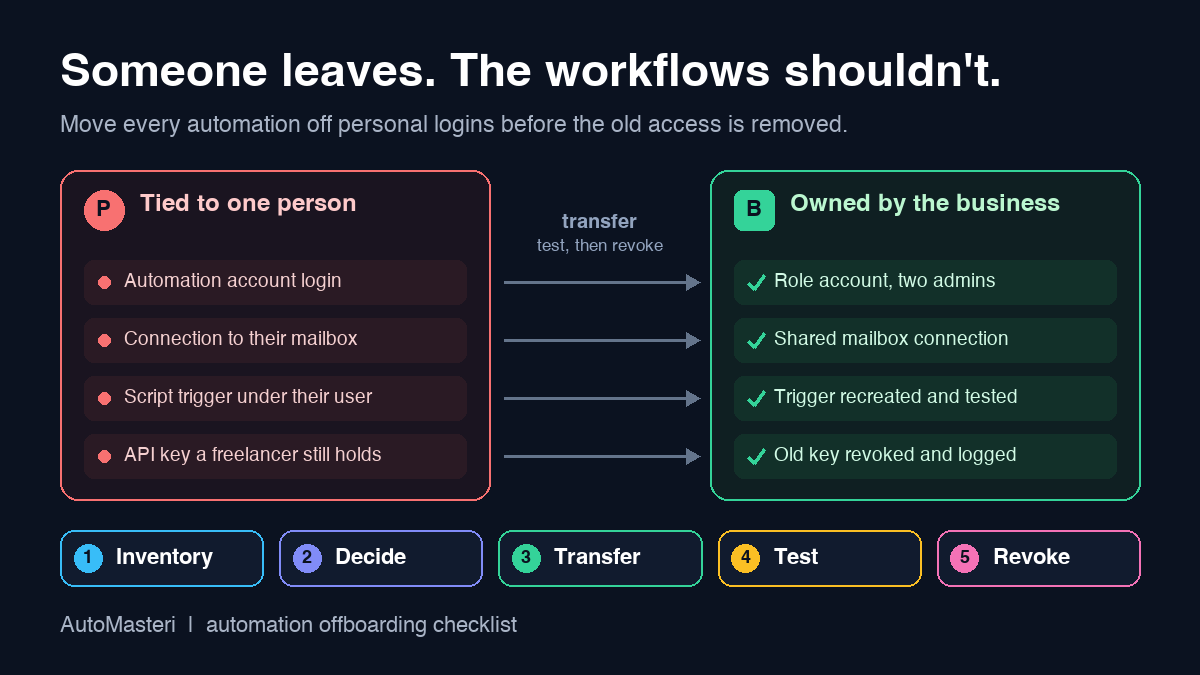
When someone leaves, their automations do not leave with them
Most small businesses have a routine for a departing employee: collect the laptop, change shared passwords, forward the email. What gets missed is the layer underneath. The website form that feeds the CRM was set up in their automation account. The follow-up emails go out through a connection to their mailbox. The Monday report is a script that runs under their login. The freelancer who built the WhatsApp reminders still has the API key.
When that person's access is removed, those workflows fail in one of two ways. They stop, because the identity they relied on is gone, or they keep running as someone who no longer works for you, which is worse. A former colleague's name on customer emails, or a contractor who can still read your lead data, is a trust problem, not a technical glitch.
Automation offboarding is the short, ordered routine that prevents both: find everything that depends on the person, move it to an account the business controls, prove it works, and only then remove the old access. It applies equally to employees, freelancers and agencies.
The automation ownership register
Keep one row per workflow, filled in while the person can still answer questions. The fields you cannot complete are where the risk sits.
- Workflow: what it does in plain language, such as 'website enquiry creates a CRM lead';
- Platform and account: the tool and the workspace it lives in;
- Builder and owner: who created it and whose account owns it today;
- Identities it acts as: every connection, mailbox, API key or login it uses;
- Person-bound pieces: webhooks, scripts, inbox rules or devices that exist only under that person;
- Business owner and backup after the handover;
- Decision: transfer, rebuild, or retire;
- Verification: the test run and evidence under the new owner;
- Old access removed: what, by whom, and when.
1. Start the inventory before the last day
Map someone's automations during their notice period or the final weeks of a freelance contract, not after their account is closed. They know which workflows matter and where the workarounds live; once they have gone, you are reverse-engineering run histories.
Ask for a short walk-through of each live workflow and capture it in the register. Where the platform can export a list, use it. On Zapier's Team and Enterprise plans, for example, an admin can download a CSV of a member's Zap workflows and app connections before removing them, which gives you a starting inventory instead of a guess.
2. Find every place the person's identity is used
A workflow can depend on a person in places that never appear in its own dashboard. Check each of these:
- Automation tool accounts, folders and workspaces they own or administer;
- App connections authorised with their own login, such as their Gmail, calendar, CRM user or social account;
- API keys, tokens and webhook endpoints created under their user;
- Scheduled scripts and spreadsheet triggers in their personal or work drive;
- Mailbox rules and forwarding that silently move enquiries or invoices;
- Phone numbers or devices used for two-step verification or messaging accounts;
- Shared logins they know the password for, including any kept outside your password manager.
Scripts deserve special attention. Google's Apps Script documentation states that installable triggers always run under the account of the person who created them, so a reporting script built by a departing colleague is tied to that colleague's account even if the spreadsheet itself is shared with the whole team.
3. Decide what to transfer, rebuild or retire
Not every workflow deserves to survive, and departures are a natural moment to prune. Transfer workflows that are healthy, understood and needed. Rebuild the ones that work but rely on fragile shortcuts, such as a personal mailbox or a credential nobody else can see. Retire anything that nobody can explain, nobody would miss, or that duplicates a newer process.
Write the decision and the reason in the register. If a workflow takes actions that affect customers or money, confirm who approves those actions under the new owner; the human approval matrix guide covers how to set that boundary: https://automasteri.com/blog/human-approval-matrix-ai-automation/ .
4. Move ownership to a business-controlled account
Every workflow should live in an account the business owns, on a role address such as an operations mailbox, with at least two people able to administer it. A personal login is a single point of failure even while that person is still with you.
Learn how your platform behaves before you click transfer. Zapier's help centre explains that when a member is removed from a Team or Company account, their Zaps and app connections can be transferred to another user, the Zaps keep their on or off status, and the webhook URL in any Zap using a Catch Hook trigger changes because it is tied to the Zap owner. Any form posting to the old address must be updated, or the workflow will look healthy while receiving nothing. Zapier also states it cannot transfer ownership of the Zapier account itself if the departing person was the account owner; access then depends on controlling that person's email address. That is a strong argument for registering the main account on a business address from day one.
In Make, connections created in a team can be used and managed by everyone in that team, and you can see which scenarios use each connection. Convenient, but a shared connection may still authenticate as one individual's third-party account underneath. Make also notes that editing a connection means providing all the credentials again, so plan to reauthorise with the business account.
5. Reconnect credentials in a safe order
The order matters more than the speed. For a planned departure, create the new connection under the business account first, switch each workflow to it, run a test, and only then revoke the old credential. Revoking first turns a tidy handover into an outage.
The exception is a departure where trust is in doubt. If there is any risk of misuse, remove the person's access immediately and accept a short interruption. Switch the affected processes to their manual fallback, such as working enquiries straight from the form's own inbox, until the workflows are reconnected.
6. Test every moved workflow end to end
A transfer is not finished when the dashboard shows the new owner. Send a test record through each workflow and confirm the result where the business sees it: the CRM lead has the right fields, the customer email comes from the business address, the report lands in the right folder, and nothing ran twice.
Pay extra attention to anything triggered from outside, such as forms, payment notifications or booking tools, because those often point to an address that changed. The automation user acceptance testing checklist gives a fuller method for proving behaviour before you rely on it: https://automasteri.com/blog/automation-user-acceptance-testing-checklist/ .
7. Revoke old access and record it
Once the new setup is proven, remove the person's tool seats, personal connections, API keys, tokens and any third-party apps they authorised, and change shared passwords they knew. NIST SP 800-53, the US federal catalogue of security and privacy controls, includes account management controls for disabling accounts that are no longer required. A small business need not adopt that catalogue, but the principle holds: access should end when the need ends, and you should be able to show when.
Be careful with deletion. Google's Workspace admin help explains that when a user is deleted, data that has not been transferred to another user is deleted; some data can be restored for 20 days, after which it is unrecoverable. It recommends suspending or archiving a user if you want to keep their data, and transferring Drive files and calendars before deletion. Transfer the files your automations use and delete the account only when nothing still depends on it.
8. Watch the first few weeks closely
Some breakages surface later. Zapier lets an admin keep a removed member's private connections active for 30 days or until they expire, which is useful for continuity but means a hidden dependency can surface weeks afterwards. Monthly and quarterly workflows will not run at all during the handover window.
For the first few weeks, compare what goes in with what comes out for every transferred workflow, and keep the register rows open until each one has completed at least one normal cycle. The automation exception monitoring checklist shows how to spot runs that never happened: https://automasteri.com/blog/automation-exception-monitoring-checklist-small-business/ .
Freelancers and agencies: settle ownership on day one
Much offboarding pain comes from work set up in someone else's account to save time. A contractor builds in their own automation account, demos it, and moves on. When the engagement ends, the business discovers it never owned what it paid for.
Agree the ownership rules before any build starts. Workflows are created inside the business's own accounts. Credentials are stored in the business's password manager, not sent over chat. The contractor gets a named seat that can be removed, and the handover includes the register rows for everything they touched. These rules fit a wider ownership model, described in the guide to a business automation operating system: https://automasteri.com/blog/business-automation-operating-system-smes/ .
A worked example: the sales coordinator's last week
In a small coaching business, the sales coordinator built the lead handling. Website enquiries hit a Zap through a Catch Hook trigger, create a CRM lead, and send an acknowledgement through her own mailbox. Her spreadsheet script emails the owner a pipeline summary every Monday.
During her notice period the owner fills in three register rows with her. The Zap is transferred to the operations account, the website form is updated to the new webhook address, and the acknowledgement connection is rebuilt on the shared sales mailbox so customers stop seeing her name. The Monday script is recreated under the operations account, since its trigger belonged to her. A test enquiry confirms the lead, the sender and no duplicates. After her last day, her seat is removed, her mailbox connection revoked, and her account suspended rather than deleted until next month's checks pass.
Sources and next step
Sources, all returning HTTP 200 on 13 October 2026. Zapier, removing members: https://help.zapier.com/hc/en-us/articles/8496281082253-Remove-members-from-your-Team-or-Company-account . Zapier, access after a user leaves: https://help.zapier.com/hc/en-us/articles/17416146912781-How-do-I-access-an-account-after-a-user-leaves . Make, connections: https://help.make.com/connect-an-application . Google Apps Script, installable triggers: https://developers.google.com/apps-script/guides/triggers/installable . Google Workspace, deleting a user: https://knowledge.workspace.google.com/admin/users/delete-or-remove-a-user-from-your-organization . NIST SP 800-53 Rev. 5: https://csrc.nist.gov/pubs/sp/800/53/r5/upd1/final . Platform behaviour changes, so check current documentation for your plan before a transfer; these references are not a claim that AutoMasteri is certified or uses a particular platform.
Fill in the register row for your most important workflow this week, even if nobody is leaving. For help finding which automations depend on one person, start with the free automation audit: https://automasteri.com/free-automation-audit/ . AutoMasteri offers mentorship, strategy and guided implementation; migrating or rebuilding workflows is agreed separately and is not implied by this checklist.
FAQ
What is automation offboarding?
It is the part of offboarding that deals with workflows, connections, scripts and API keys tied to a departing employee, freelancer or agency. The aim is to move what is still needed to a business-owned account, prove it works, and then remove the old access.
Should I delete a former employee's account straight away?
Only after you have transferred the data and workflows that depend on it. Google Workspace, for example, deletes data that was not transferred, with a limited restore window. Suspending the account first gives you time to confirm that nothing still relies on it.
Why did my Zap stop receiving data after an ownership transfer?
If the Zap used a Webhooks Catch Hook trigger, Zapier's documentation says the webhook URL changes when ownership transfers, because the URL is tied to the Zap owner. Update the form or system that posts to it, then send a test record.
What should I do if a departure is not on good terms?
Remove the person's access first, then reconnect the workflows. Switch the affected processes to their manual fallback until each one is rebuilt under a business account and tested.
How do I stop this problem happening with freelancers?
Have freelancers build inside your own accounts, store credentials in your password manager, give them a named seat that you can remove, and make the ownership register part of the handover.
Does AutoMasteri transfer my automations for me?
AutoMasteri provides mentorship, strategy and guided implementation, so it can help you plan and work through the checklist. Hands-on migration or rebuild work is scoped and agreed separately.
Build the map before the tools.
Start with the free AutoMasteri automation audit, or apply for a mentor review if you want Reji to review the operating system behind your customer journey.