Operating systems · 10 min read
How to Build a Business Automation Operating System for an SME
Connect leads, sales, delivery, support, reviews, reporting, controls, and safe human handoffs in one SME operating system.
By Reji Modiyil · Published 2026-07-15 · Updated 2026-09-21
Direct answer
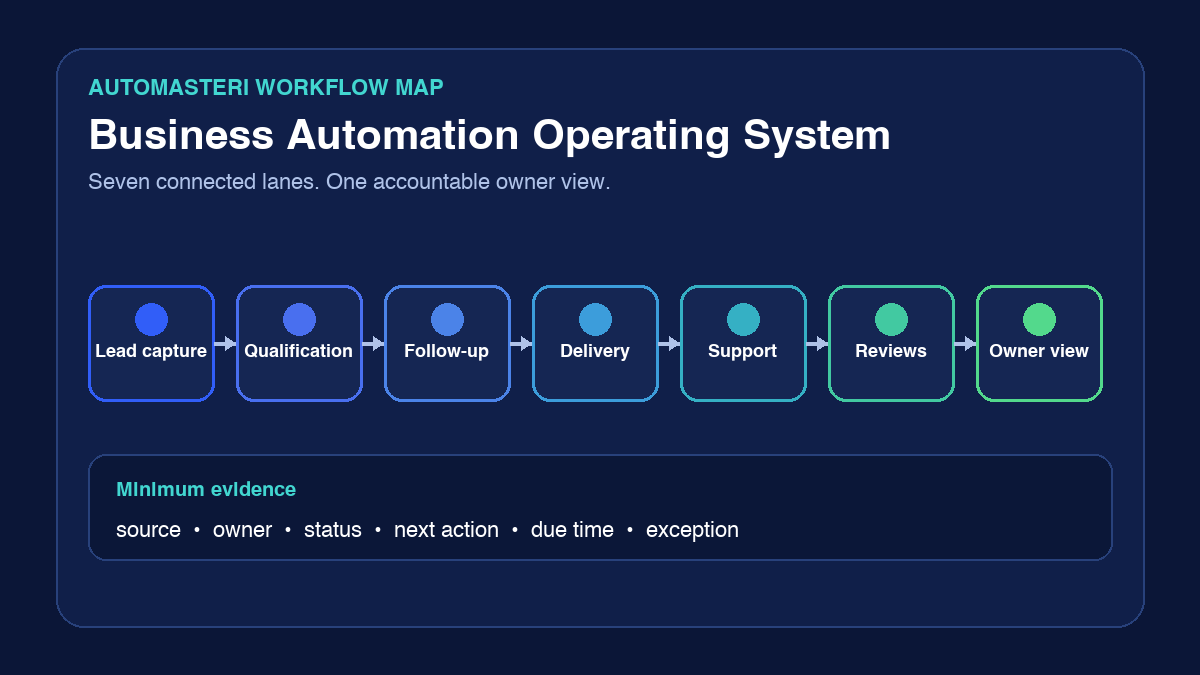
A business automation operating system is the documented set of workflows, owners, records, controls, and review routines that moves work from an event to a verified outcome. For an SME, it should connect seven operating lanes: lead capture, qualification, follow-up, delivery, support, reputation, and owner reporting.
Do not begin with a shopping list of tools. Begin with one customer journey, name the owner of every handoff, define what evidence proves completion, and decide where automation must stop for human judgement. A useful operating system makes pending work visible, contains failures, protects customer data, and can be rolled back when a change causes harm.
Why a tool stack is not an operating system
WhatsApp, a website form, a spreadsheet, a CRM, an inbox, and an AI assistant can all be useful. They do not become an operating system merely because they are connected.
An operating system answers questions that tools alone cannot:
- What event starts the workflow?
- Which record becomes the source of truth?
- Who owns the next action?
- What is the due time?
- What happens when data is incomplete or duplicated?
- Which actions require approval?
- How is failure detected, contained, retried, or escalated?
- What evidence proves the customer reached the intended outcome?
- How can the last change be reversed?
If those answers are missing, automation can move confusion faster. It may acknowledge an enquiry without assigning an owner, send a reminder after the customer opted out, mark a task complete without delivery evidence, or hide a failed integration behind a green dashboard.
The seven operating lanes
1. Lead capture
Create one lead record from each valid enquiry source: website, WhatsApp, phone, advertising, referral, email, or marketplace. Store only the data needed to serve and qualify the enquiry.
Minimum fields normally include source, received time, contact context, requirement, owner, next action, due time, consent or customer-initiated context where relevant, and current status. Preserve the provider event ID so retries do not create duplicate leads.
2. Qualification
Separate sales enquiries, support requests, existing-customer work, partnerships, spam, and unsuitable requests. Use a small set of questions tied to the real decision: problem, urgency, location, budget or package fit, decision-maker status, preferred language, and next step.
Automation may collect and classify low-risk facts. A person should review unusual, high-value, legal, payment, account-access, security, health, complaint, or promise-making cases.
3. Follow-up
Acknowledgement, ownership, and progress are different events. A sent message does not prove a team member accepted responsibility.
Define a primary owner, backup owner, realistic service window, follow-up sequence, opt-out handling, overdue rule, and closure reason. For WhatsApp, confirm opt-in, template requirements, the 24-hour service window, and a clear human-escalation path before automating outbound messages.
4. Delivery and onboarding
After a sale or approval, create a handover that records scope, promised outcome, required assets, dependencies, responsible people, milestones, support route, and acceptance evidence. Do not let payment confirmation become the end of the workflow.
The customer should know what happens next, what remains their responsibility, what is included, and which channel is authoritative.
5. Support and exceptions
Convert support requests into trackable work when they cannot be resolved safely in the current conversation. Record severity, owner, affected service, evidence, next update, resolution, and customer confirmation where appropriate.
Create explicit exception paths for provider outage, duplicate event, incomplete data, delivery failure, angry customer, refund or payment dispute, security concern, and unavailable owner. A workflow without an exception path is only a demo.
6. Reputation and retention
Ask for feedback only after a genuine service milestone. Do not pressure customers, suppress negative feedback, or route only happy customers to a public review destination.
Keep review requests, feedback, complaints, renewal signals, and follow-up tasks linked to the customer record so the team can act consistently without turning private support context into public marketing content.
7. Owner reporting
Report work that requires a decision, not vanity totals. A useful owner view shows new leads, unaccepted work, overdue next actions, failed automations, open exceptions, delivery bottlenecks, support ageing, opt-outs, and unresolved customer-risk items.
Every number should link back to the underlying records. If a dashboard cannot explain why a count changed, it is not reliable management evidence.
Add a control plane across all seven lanes
The seven lanes describe customer and team work. A control plane keeps them trustworthy.
Ownership
Every workflow, integration, template, data store, and exception queue needs a named business owner and a technical owner or support route. Notification is not ownership; record acceptance.
Evidence
Use timestamps, event IDs, status history, error codes, owner changes, approvals, and cleanup records. Avoid recording full sensitive payloads when a bounded identifier and outcome are enough.
Access and data minimisation
Give people and integrations only the access they need. Define retention and deletion. Keep production credentials out of source, screenshots, tickets, and general-purpose automation tools.
Change and rollback
Make small, reversible changes. Test with labelled synthetic records. Preserve the last known-good configuration, document rollback, and stop a rollout when customer-critical checks fail.
Human authority
List actions automation may perform, actions it may only draft, and actions that require a person. Human review should be meaningful: the reviewer needs context, time, authority, and a way to reject or correct the recommendation.
A practical implementation method
- Choose one journey with a visible leak, such as website enquiry to qualified follow-up.
- Draw the current path, including manual messages, spreadsheets, forwarding, and waiting.
- Mark the source of truth, trigger, owner, next action, due time, evidence, and exception at every step.
- Remove unnecessary handoffs before adding automation.
- Automate one bounded, reversible slice.
- Test normal, duplicate, incomplete, delayed, failed, opt-out, and high-risk cases with labelled synthetic data.
- Verify cleanup and rollback.
- Run the workflow with a small real operating window only after approval.
- Review failures and overdue work weekly.
- Expand to the next lane only when the first lane is observable and owned.
The minimum operating-system register
For each workflow, record:
- purpose and customer outcome;
- trigger and authoritative record;
- required inputs and data classification;
- primary and backup owners;
- allowed automatic actions;
- human-review triggers;
- next-action and overdue rules;
- provider or integration dependencies;
- evidence and monitoring;
- failure, retry, and escalation paths;
- retention and deletion;
- test cases and last test date;
- rollback procedure;
- document owner and review date.
This register is more valuable than a diagram that only shows the happy path.
How to measure whether the system is working
Use measures tied to control and customer outcomes:
- valid enquiries captured versus received;
- time to accepted ownership, not just automated acknowledgement;
- percentage with a next action and due time;
- overdue work recovered by a backup owner;
- duplicate and failed-event rate;
- customer-impacting exceptions still open;
- delivery milestones accepted;
- support issues resolved with evidence;
- opt-outs and unwanted-message complaints;
- automation changes rolled back or corrected after failure.
Do not claim revenue or productivity gains unless the business has a documented baseline, a comparable measurement period, and evidence that separates automation from other changes.
Where AutoMasteri fits
AutoMasteri currently offers an application-led digital-transformation mentorship and a free automation-audit route. The audit covers website, CRM, follow-up, WhatsApp, tool connection, lead sources, and operational bottlenecks. It can help an owner identify the weakest lane and plan a first roadmap.
It does not replace the owner's decisions, staff participation, provider approval, legal advice, security review, testing, or implementation evidence, and it does not guarantee a business outcome.
Start with one recent customer journey. Reconstruct it from the first event to the final outcome. The first missing owner, next action, or evidence field is the first operating-system defect to repair.
Sources
- NIST, Cybersecurity Framework 2.0, accessed 2026-09-20: https://www.nist.gov/cyberframework — governance and risk-management outcomes for organisations of any size.
- NIST, AI Risk Management Framework, accessed 2026-09-20: https://www.nist.gov/itl/ai-risk-management-framework — voluntary practices for incorporating trustworthiness into the design, use, and evaluation of AI systems.
- AWS, Operational Excellence Pillar, publication 2024-11-06, accessed 2026-09-20: https://docs.aws.amazon.com/wellarchitected/latest/operational-excellence-pillar/welcome.html — observable operations, effective event response, continuous improvement, and operations aligned with business goals.
- WhatsApp Business Messaging Policy, accessed 2026-09-20: https://business.whatsapp.com/policy — opt-in and opt-out duties, approved templates, 24-hour user-initiated reply window, data duties, and human-escalation requirements.
- AutoMasteri, Digital Transformation Mentorship and Free Business Automation Audit, accessed 2026-09-20: https://automasteri.com/ and https://automasteri.com/free-automation-audit/ — current product and delivery-boundary truth.
Build the map before the tools.
Start with the free AutoMasteri automation audit, or apply for a mentor review if you want Reji to review the operating system behind your customer journey.